Appinstall.info – Google Camera—popularly known as GCam—continues to dominate mobile photography in 2025. Its powerful computational photography engine transforms ordinary shots into crisp, vibrant, and professional-looking images. Besides that, features like HDR+ Enhanced, Night Sight 2.0, Astrophotography, and Super Res Zoom help any compatible smartphone perform like a flagship device.
In this guide, you’ll discover the best tips, tricks, and pro-level settings to instantly improve your photos. Therefore, you don’t need an expensive camera to produce sharp and cinematic results.
What is Google Camera (GCam)?
Before diving into the technical features, it helps to understand why GCam became so popular. Many smartphone cameras rely heavily on hardware, but Google takes a different approach. Instead of depending solely on the lens or sensor, Google focuses on computational photography—a technique that improves images through software and AI.
Google Camera is Google’s official camera app made for Pixel devices. It uses Google’s advanced processing engine to analyze every scene, adjust lighting, enhance colors, and sharpen details automatically. Oleh karena itu, even simple shots can look clean, bright, and professionally balanced.
As time passed, developers created GCam ports—modified versions of the app that work on non-Pixel devices. Selain itu, these ports allow users from Xiaomi, Samsung, OnePlus, Realme, and many other brands to enjoy the same image quality found on Pixel phones. This is why GCam quickly became a favorite among mobile photography enthusiasts.
Why It’s Special
Google Camera offers several advantages that users feel immediately:
Superior image processing
GCam analyzes multiple frames and blends them intelligently. Selanjutnya, this process gives you sharper photos with better detail.
Exceptional dynamic range
The app handles bright and dark areas very well. Di sisi lain, most stock cameras struggle to keep both balanced.
Natural and accurate colors
Compared to many cameras that oversaturate photos, GCam produces colors that look realistic and pleasant.
Impressive low-light performance
Night photos appear brighter and cleaner without extra noise. Setelah itu, you don’t need flash in most nighttime situations.
Sharp details with minimal noise
GCam sharpens edges while keeping textures smooth. Sebagai tambahan, its noise reduction keeps the image clean without losing detail.
If you regularly use Chrome or other Google tools, you may also find the following guide helpful: Google Chrome: A Comprehensive Guide
Key Google Camera Features in 2025
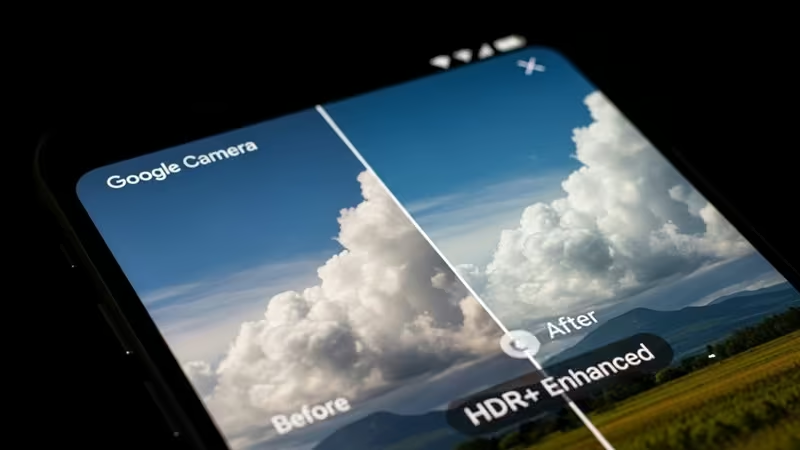
HDR+ Enhanced
This mode merges multiple frames to deliver sharp images with excellent dynamic range—ideal for bright and backlit environments.
Night Sight 2.0
The latest Night Sight captures brighter, cleaner night photos without using flash. Skin tones and shadows stay natural.
Astrophotography Mode
A long-exposure mode designed for shooting stars, Milky Way, and night landscapes with impressive detail.
Super Res Zoom
AI-based zoom processing that maintains finer detail compared to standard digital zoom.
Ultra HDR & Ultra Res
Perfect for outdoor landscapes, offering vivid colors, enhanced sharpness, and low noise.
Google Camera Tips and Tricks (2025 Edition)
1. Use HDR+ Enhanced for Outdoor Scenes
This mode balances highlights and shadows effectively. Besides that, it keeps outdoor shots sharp and natural.
2. Adjust the Exposure Slider Manually
Set exposure to –0.3 or –0.7 to avoid blown highlights. After that, your images will appear more cinematic.
3. Use Long Exposure for Motion Effects
Great for soft water flow, light trails, and creative nighttime effects.
4. Optimize Portrait Mode
Use good lighting and keep a 0.7–1 meter distance from the subject. Then, GCam will generate smooth and realistic bokeh.
5. Shoot in RAW for More Editing Control
Enable RAW format if you want maximum detail when editing in Lightroom, Snapseed, or Photoshop.
Best Google Camera Settings (2025 Recommended)
Recommended GCam Settings
These settings offer consistently great results:
- HDR+: Enhanced
- Sharpness: Medium–High
- Noise Reduction: Medium
- Exposure Compensation: –0.3
- White Balance: Auto + AWB Pixel
- Portrait Sharpening: On
- Enable Sabre (Zoom Detail): On
This combination maintains sharpness, natural colors, and low noise.
Best Phones for Google Camera (2025 Compatibility)
Google Camera performs exceptionally well on:
- Google Pixel Series
- Xiaomi (Redmi, Mi, Poco)
- Samsung Galaxy A/S Series
- OnePlus
- Realme (supported models)
- Vivo (with proper configs)
For best performance, always load an XML configuration file suited for your phone model.
Downloading Google Camera — What You Should Know
Download GCam only from reputable developers such as:
- BSG
- Arnova8G2
- MGC
On the other hand, make sure you check compatibility before installing any version.
FAQ (Text-Only Schema Friendly)
- What makes Google Camera better than stock camera apps?
Google Camera uses advanced computational photography that improves clarity, dynamic range, and low-light performance. - Can all Android phones install GCam?
No. GCam requires Camera2 API support and compatible ports for each device. - What is the most useful GCam mode?
HDR+ Enhanced delivers the best balance of sharpness, color, and dynamic range. - Is GCam safe to download?
Yes, as long as you download it from trusted developers like BSG or Arnova. - How can I take better low-light photos with GCam?
Use Night Sight 2.0, keep your phone steady, and lower the exposure slightly. - Should I shoot in RAW every time?
Shoot in RAW if you plan to edit. Otherwise, JPEG from GCam is already excellent.
Conclusion
Google Camera remains one of the most powerful photography tools available for Android users. With its AI-powered processing, HDR+, and pro modes, GCam continues to deliver stunning results in 2025. If you apply the tips and recommended settings from this guide, your smartphone photos will instantly look sharper, cleaner, and more cinematic.
Related on AppInstall.info: the best utility software for your PC.